published
City Pulse
Dockerized traffic vision pipeline using MDOT HLS streams, Redis queues, YOLO inference, TimescaleDB, and Streamlit dashboards, hardened from fragile prototype into repeatable local stack.
Published May 3, 2026
- mlops
- computer-vision
- streamlit
- docker
- timescaledb
- redis
Short Summary
City Pulse moved from “video plays but chart is flat” to reproducible local traffic analytics stack with practical debugging controls, healthier containers, and better counting behavior.
Problem
Preview video looked live even when pipeline was not writing useful data. Inference services failed in non-obvious ways, container health was weak, and counting behavior needed better runtime controls.
What I Built
Build a local-first MLOps traffic pipeline on public Maryland DOT HLS streams:
- Sample frames from HLS.
- Queue frames in Redis.
- Run YOLO inference through MLServer and aiSSEMBLE inference runtime.
- Write counts to TimescaleDB.
- Show trends and operational state in Streamlit.
- Optionally generate daily text briefs with Sumy.
Built With
- Python 3.12 (local
venv) - Redis
- TimescaleDB (Postgres)
- MLServer
aissemble-inference-yoloaissemble-inference-sumy- Docker Compose
- Streamlit
- Public MDOT HLS (
playlist.m3u8)
Core processes:
city-pulse-ingestcity-pulse-vision-workerstreamlit run src/city_pulse/dashboard/app.py- Docker services:
redis,timescaledb,yolo(optionalsumy)
Architecture
A key lesson: preview video and chart data are separate paths. The video can look live while the pipeline is not writing a single row.
flowchart TB
    A["MDOT HLS\nplaylist.m3u8"] --> B["Ingest\ncity-pulse-ingest"]
    B --> C["Redis Queue"]
    C --> D["Vision Worker\ncity-pulse-vision-worker"]
    D --> E["YOLO Runtime\nMLServer + aiSSEMBLE"]
    E --> F["Vehicle Counts\nTimescaleDB"]
    F --> G["Streamlit Dashboard"]

    B -. "sample interval + JPEG quality" .-> C
    D -. "ROI + temporal IoU dedup" .-> F
    D -. "debug overlay payload" .-> H["Redis Overlay"]
    H --> G
Security and Reliability Decisions
- Kept stack local-first so stream processing, queues, and dashboards can run without cloud dependencies.
- Added preflight checks for Redis, Postgres, and YOLO readiness before trusting pipeline health.
- Split logs and overlay debugging so failures become observable instead of guesswork.
Results
- one-command bring-up with preflight
- reliable YOLO startup
- live visual debugging overlay
- runtime ingest tuning
- ROI + temporal dedup controls
- clearer dashboard metrics and behavior
Next big step: replace heuristic dedup with true tracking and optional line-crossing counts.
What I Learned
- “Working preview” does not mean working pipeline.
- Health checks and debug overlays matter more than pretty dashboards during early ops work.
- Container-level dependency issues can hide behind generic startup failures.
Links
- Case study:
/projects/city-pulse-debugging-build-retrospective - Repo:
https://github.com/JacobThree/aissemble-pulse/
Technical Notes
What Broke and How I Fixed It
1) Live preview worked, chart stayed flat
Symptoms:
- Stream preview looked healthy.
- Chart was empty or flat.
Root causes:
- Inference service not healthy or not loaded.
- Weak visibility into ingest and vision failures.
- Camera key mismatch between seeded data and live camera.
Fixes:
- Added
scripts/preflight_stack.pyfor Redis ping, Postgres check, YOLO readiness polling (/v2/health/ready), and camera/data hints. - Updated one-command runner to emit
logs/ingest.logandlogs/vision.log. - Clarified preview-vs-pipeline behavior in docs and startup messaging.
2) YOLO container started, then disappeared
Symptoms:
docker compose psonly showed Redis and TimescaleDB.:8080health checks failed.
Root-cause sequence and fixes:
- YOLO image copied full
models/(includingsumy/), causingModuleNotFoundError: aissemble_inference_sumy. Fix: copy onlymodels/yolov8/in YOLO Dockerfile. - Missing
ultralyticsin YOLO image. Fix: addultralyticsto image requirements. - OpenCV GUI dependency failure on slim image (
ImportError: libxcb.so.1). Fix: switch toopencv-python-headless.
Result: YOLO became healthy and served inference.
3) Counts looked low relative to visible traffic
Why:
- Sparse sampling vs full frame rate.
- Detection misses on compressed HLS (small/far/night objects).
- Confidence threshold too strict.
yolov8ntraded recall for speed.
Fixes and tuning:
- Added explanatory dashboard copy.
- Added 1-minute buckets and smoothed trend view.
- Added runtime sampling controls (Redis-backed).
- Added visual debug overlay.
- Upgraded model to
yolov8s.pt. - Tuned defaults: lower confidence, faster sampling, higher JPEG quality.
4) Overlay toggle did nothing in early runs
Root causes:
- Worker overlay flag not enabled in some runs.
- UI process state and worker restart state drifted.
Fixes:
- Enabled
VISION_DEBUG_OVERLAY_ENABLED. - Restarted worker and stack with updated env.
- Added UI misconfiguration warnings.
- Verified overlay payload in Redis.
- Added periodic overlay fragment refresh.
5) Recounting across adjacent frames
Why:
- Baseline counted detections per frame, not per tracked identity.
Fixes implemented:
- Optional ROI filter:
VISION_ROI_NORM. - Temporal IoU dedup controls:
VISION_DEDUP_ENABLEDVISION_DEDUP_IOU_THRESHOLDVISION_DEDUP_TTL_SECONDS
- ROI box rendered on overlay for visual validation.
Limitation:
- This reduces recounting but is still heuristic. It is not full identity persistence.
UI and Ops Improvements
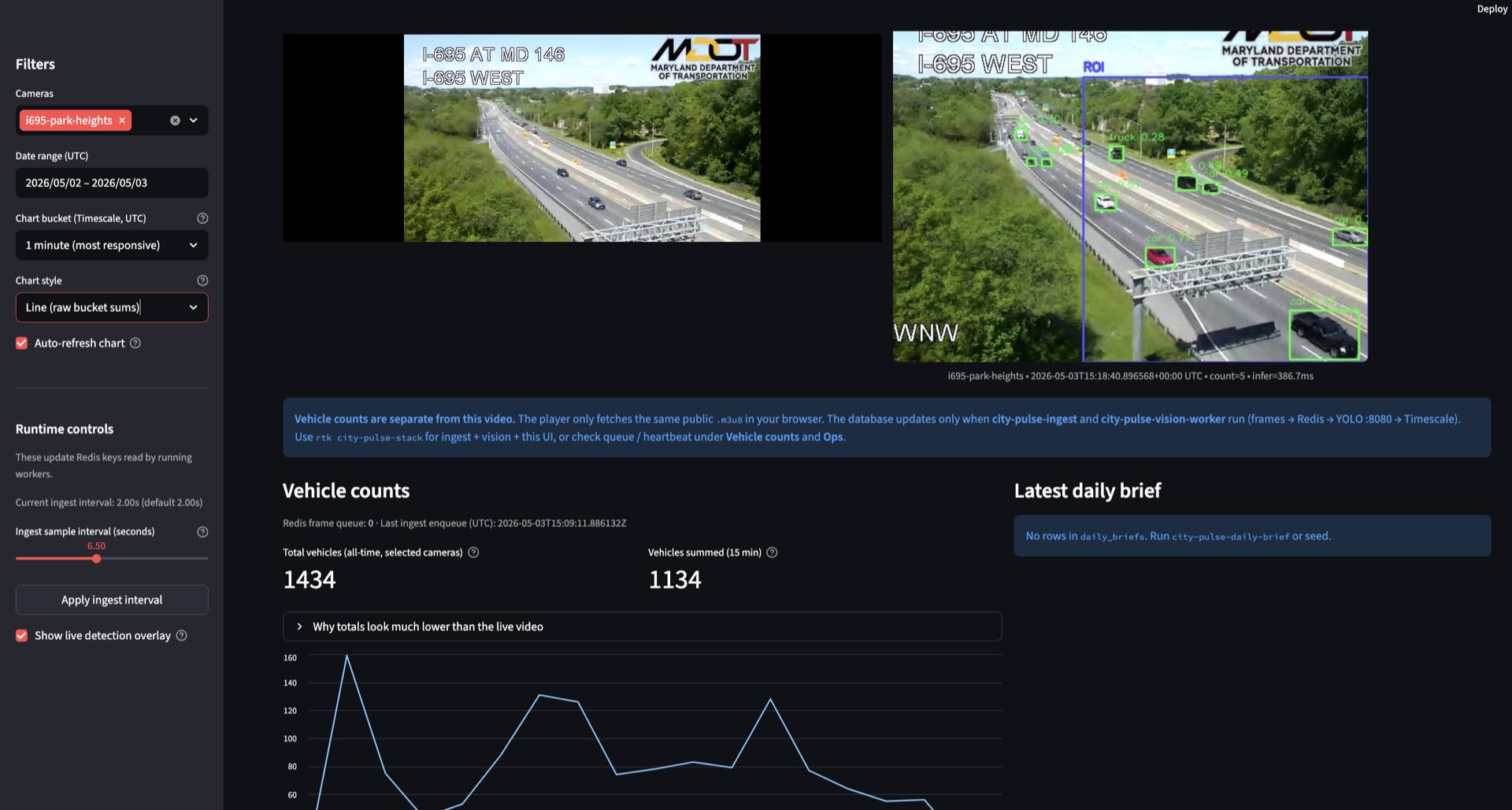
- Side-by-side live preview and annotated overlay.
- Smaller preview footprint.
- More useful metrics:
- all-time total vehicles (selected cameras)
- vehicles summed over last 15 minutes
- Removed less useful “last row detected” metric.
- Added operational hints and runtime tuning controls.
- Added
scripts/preflight_stack.pyand improvedscripts/run_local_stack.shstartup behavior.
Debug Overlay Screenshot
Current Gaps
- Counting is still frame-sum based, not “count each vehicle once.”
- Temporal IoU dedup is camera-dependent and approximate.
yolov8simproves recall but increases latency.- Streamlit deprecation warnings remain (
st.components.v1.html,use_container_width). - Runtime resiliency can improve for transient Redis/HLS interruptions.
- ROI editor UX (drag box in UI) is not implemented.
Recommended Next Roadmap
Phase 1: Practical short-term
- Add ROI preset controls per camera.
- Add dedup IoU and TTL sliders.
- Add latency and throughput panel (infer p50/p95, queue age, frames/sec).
- Add a preset selector: Recall, Balanced, Fast.
Phase 2: Accuracy jump
- Add simple multi-object tracking (ByteTrack-style IDs).
- Add optional line-crossing mode to count each object once.
Phase 3: Performance
- Profile bottlenecks and tune frame size, model size, interval, and batch behavior.
- Evaluate Apple Silicon acceleration outside current container limits.
Reproducible Runbook
cd "/Users/jacobsmythe/i695 traffic"
source .venv/bin/activate
rtk docker compose up -d redis timescaledb yolo
rtk bash scripts/run_local_stack.sh
Open http://localhost:8501
If needed:
tail -f logs/ingest.log logs/vision.logBaseline Env That Worked Well
VISION_MIN_CONFIDENCE=0.15INGEST_SAMPLE_INTERVAL_SECONDS=2.0INGEST_JPEG_QUALITY=92VISION_DEBUG_OVERLAY_ENABLED=1VISION_ROI_NORM=0.40,0.20,1.00,1.00VISION_DEDUP_ENABLED=1VISION_DEDUP_IOU_THRESHOLD=0.35to0.60(camera dependent)VISION_DEDUP_TTL_SECONDS=2.0to5.0